Technical SEO Checklist: 15 Essential Steps to Improve Website Performance
Technical SEO checklist is the foundation of a healthy, search-engine-friendly website. Even if you publish high-quality content and build authoritative backlinks, your website may struggle to rank if search engines cannot crawl, index, and understand your pages properly. A complete technical SEO checklist helps eliminate these issues and ensures your website performs efficiently for both users and search engines.
Technical SEO focuses on optimizing the backend and technical aspects of your website. It improves crawlability, indexability, website speed, mobile usability, security, structured data, and overall site performance. These improvements not only help search engines access your content more effectively but also provide visitors with a faster and smoother browsing experience.
If you’re new to SEO, start by reading our What Is SEO? guide. You can also explore our On Page SEO Checklist and Off Page SEO guide before implementing the technical optimizations discussed in this article.
In this guide, you’ll learn 15 essential steps that every website owner should include in a technical SEO checklist to improve website performance, increase search visibility, and create a strong foundation for long-term SEO success.
What Is a Technical SEO Checklist?
A technical SEO checklist is a structured list of tasks that help optimize the technical health of a website. It ensures search engines can efficiently crawl, index, and understand your webpages while providing users with a fast, secure, and mobile-friendly experience.
Unlike On-Page SEO, which focuses on content optimization, or Off-Page SEO, which focuses on authority building, technical SEO improves the infrastructure of your website.
A complete technical SEO checklist generally includes:
- Website speed optimization
- Core Web Vitals
- Mobile responsiveness
- HTTPS security
- XML sitemap
- Robots.txt optimization
- Canonical tags
- Structured data (Schema Markup)
- Broken link fixes
- Redirect management
- Crawlability improvements
- Indexability optimization
Following a technical SEO checklist regularly helps identify and resolve technical issues before they impact your search rankings.
Why Is a Technical SEO Checklist Important?
A website with excellent content can still struggle to rank if technical SEO issues prevent search engines from accessing or understanding its pages.
Using a technical SEO checklist ensures your website remains healthy, efficient, and optimized for both search engines and users.
Improves Crawlability
Search engines use bots to crawl websites and discover new content.
A properly optimized website makes it easier for these bots to navigate your pages without encountering unnecessary obstacles.
Better crawlability means your new content is discovered faster.
Enhances Indexability
After crawling a page, search engines decide whether it should be added to their index.
A good technical SEO checklist helps ensure important pages are indexed while preventing duplicate or low-value pages from appearing in search results.
Improves Website Performance
Website speed is a major ranking factor and directly affects user experience.
A technically optimized website loads faster, reduces bounce rates, and keeps visitors engaged.
Faster websites also tend to achieve better conversion rates.
Supports Better User Experience
Technical SEO isn’t only for search engines.
Users expect websites to:
- Load quickly
- Work on every device
- Display correctly
- Be secure
- Navigate smoothly
Meeting these expectations improves engagement and encourages visitors to explore more pages.
Prepares Your Website for AI Search
Modern AI search platforms such as Google AI Overviews, ChatGPT, Gemini, Claude, and Perplexity rely on well-structured, accessible, and technically optimized websites.
Following a technical SEO checklist helps AI systems understand your website more effectively and increases your chances of appearing in AI-generated responses.
Technical SEO Checklist: 15 Essential Steps
The following technical SEO checklist covers the most important technical improvements every website should implement.
1. Improve Website Speed
Website speed influences both search rankings and user satisfaction.
Slow-loading pages often result in higher bounce rates and lower conversions.
To improve website speed:
- Compress images before uploading.
- Use browser caching.
- Minify CSS and JavaScript files.
- Reduce unnecessary plugins.
- Choose reliable web hosting.
A faster website provides a better experience for visitors and helps search engines crawl your pages more efficiently.
Analyze your website’s loading performance using Google PageSpeed Insights and implement its recommendations to improve speed and user experience.
2. Optimize Core Web Vitals
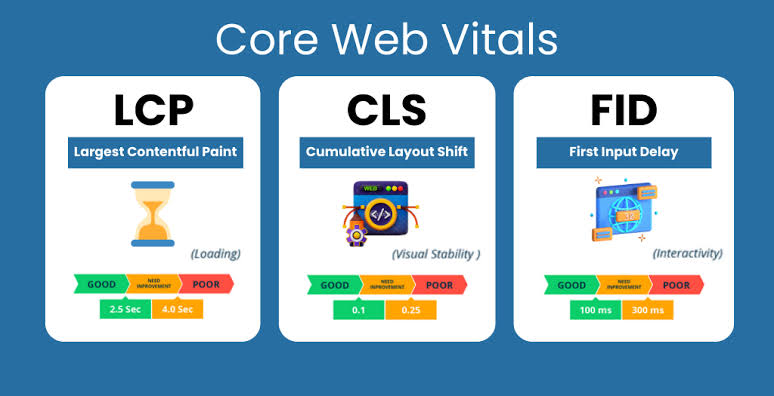
Core Web Vitals are Google’s performance metrics that measure user experience.
The three primary metrics are:
- Largest Contentful Paint (LCP)
- Interaction to Next Paint (INP)
- Cumulative Layout Shift (CLS)
Optimizing these metrics helps improve page performance and supports better search visibility.
3. Secure Your Website with HTTPS
Website security is an important ranking signal.
HTTPS encrypts the connection between your website and its visitors, protecting sensitive information and increasing user trust.
If your website still uses HTTP, migrate to HTTPS and ensure all pages redirect correctly.
4. Create and Submit an XML Sitemap
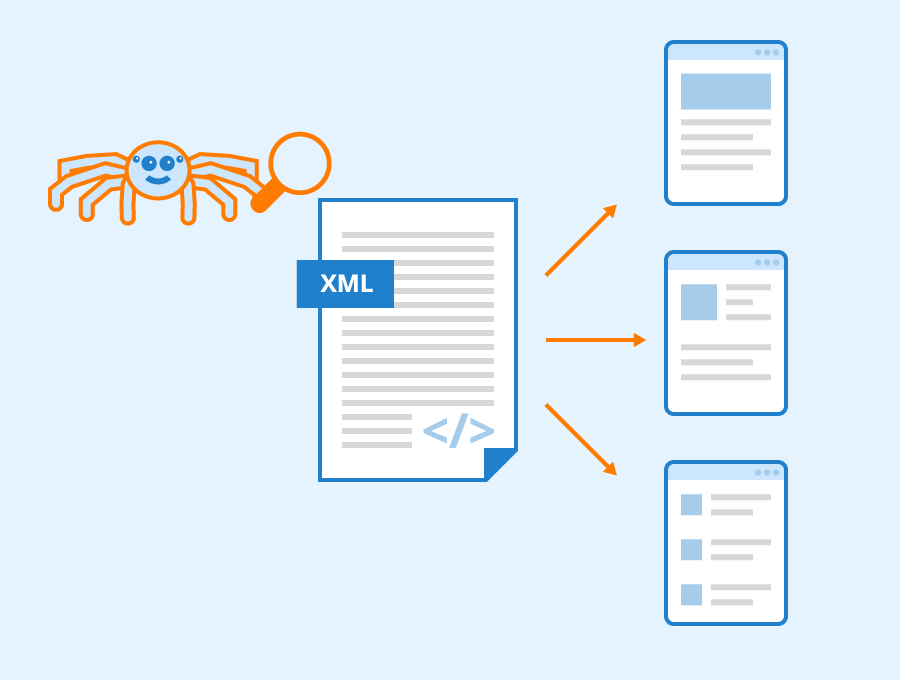
An XML sitemap helps search engines discover your important webpages more efficiently.
A sitemap should:
- Include all important pages.
- Exclude duplicate or unnecessary URLs.
- Update automatically when new content is published.
Submitting your sitemap through Google Search Console improves content discovery and indexing.
5. Optimize Your Robots.txt File
The robots.txt file tells search engine crawlers which pages they can and cannot access.
A properly configured robots.txt file helps:
- Prevent crawling of unnecessary pages.
- Protect sensitive areas of your website.
- Improve crawl efficiency.
However, avoid accidentally blocking important pages that should appear in search results.
6. Fix Broken Links
Broken links create a poor user experience and waste your website’s crawl budget.
Regularly check for:
- Broken internal links
- Broken external links
- Missing pages (404 errors)
Fixing these issues helps visitors navigate your website smoothly while improving overall SEO performance.
7. Make Your Website Mobile-Friendly
Most users now browse websites on smartphones and tablets. Google also uses mobile-first indexing, meaning it primarily evaluates the mobile version of your website when determining rankings.
To improve mobile usability:
- Use a responsive website design.
- Ensure text is easy to read without zooming.
- Make buttons large enough to tap easily.
- Optimize images for mobile devices.
- Avoid horizontal scrolling.
A mobile-friendly website is an essential part of every technical SEO checklist
8. Add Schema Markup
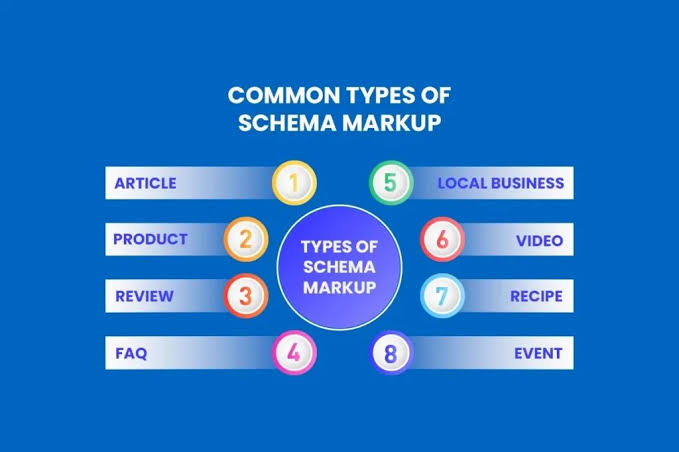
Schema markup is structured data that helps search engines better understand your content.
Common types of schema include:
- Article Schema
- FAQ Schema
- Breadcrumb Schema
- Organization Schema
- Local Business Schema
Adding schema can improve your chances of appearing in rich results, featured snippets, and AI-generated search responses.
9. Use Canonical Tags Correctly
Duplicate content can confuse search engines about which page should rank.
Canonical tags tell search engines which version of a page is the preferred one.
Canonical tags help:
- Prevent duplicate content issues.
- Consolidate ranking signals.
- Improve indexing efficiency.
Every technical SEO checklist should include reviewing canonical tags, especially on websites with similar or duplicate pages.
10. Optimize Your URL Structure
A clean URL structure helps both users and search engines understand your pages.
Good URLs should:
- Be short and descriptive.
- Include relevant keywords naturally.
- Avoid unnecessary numbers or symbols.
- Use hyphens instead of underscores.
Example:
✅ yourdomain.com/technical-seo-checklist
Avoid:
❌ yourdomain.com/page?id=4578&cat=seo
Simple URLs improve usability and make pages easier to crawl.
11. Improve Crawlability
Search engines must be able to access every important page on your website.
To improve crawlability:
- Maintain a logical site structure.
- Use internal links effectively.
- Update your XML sitemap regularly.
- Avoid orphan pages.
- Remove unnecessary redirect chains.
Improving crawlability helps search engines discover new content more efficiently.
12. Improve Indexability
Not every page on your website needs to appear in search results.
Review important pages to ensure they:
- Are indexable.
- Do not contain unnecessary noindex tags.
- Are not blocked by robots.txt.
- Return a 200 OK status code.
Proper indexability ensures search engines include your valuable content in their search index.
13. Fix Redirect Errors
Redirects help users and search engines reach the correct page after a URL changes.
However, poorly managed redirects can negatively affect SEO.
Best practices include:
- Use 301 redirects for permanent URL changes.
- Avoid redirect chains.
- Remove redirect loops.
- Update internal links after redirects.
Managing redirects correctly is an important step in a technical SEO checklist.
14. Monitor Technical SEO Performance
Technical SEO requires ongoing monitoring.
Regularly review:
- Crawl errors
- Indexing status
- Core Web Vitals
- Broken links
- Mobile usability
- Structured data reports
Monitoring these metrics helps identify technical issues before they affect rankings.
Use Google Search Console to monitor indexing status, crawl errors, Core Web Vitals, and other technical SEO issues affecting your website.
15. Perform Regular Technical SEO Audits
A website changes over time as new content, plugins, and updates are added.
Regular technical SEO audits help identify issues such as:
- Broken pages
- Duplicate content
- Missing metadata
- Crawl problems
- Indexing issues
- Security warnings
Conducting regular audits keeps your website healthy and ensures your technical SEO checklist remains up to date.
Common Technical SEO Mistakes to Avoid
Even well-designed websites can experience technical SEO problems if they are not monitored regularly.
Avoid these common mistakes:
- Slow page loading speed
- Missing XML sitemap
- Incorrect robots.txt configuration
- Broken internal links
- Duplicate content
- Missing canonical tags
- Poor mobile optimization
- HTTP instead of HTTPS
- Ignoring Core Web Vitals
- Not monitoring crawl errors
Avoiding these mistakes improves both user experience and search engine performance.
Conclusion
A well-planned technical SEO checklist forms the foundation of a successful SEO strategy. While content and backlinks are essential, technical SEO ensures search engines can efficiently crawl, index, and understand your website.
By improving website speed, optimizing Core Web Vitals, implementing structured data, fixing crawl issues, and conducting regular audits, you create a website that performs better for both users and search engines.
Technical SEO is not a one-time task. Regular maintenance and monitoring will help keep your website healthy, improve search visibility, and support long-term organic growth.
If you’re looking for the best digital marketing agency in Kannur, KLYQIN can help optimize your website with technical SEO best practices that improve performance and search rankings.
Frequently Asked Questions (FAQs)
What is technical SEO?
Technical SEO is the process of optimizing a website’s technical elements, such as website speed, crawlability, indexability, security, and structured data, to help search engines crawl and rank pages more effectively.
Why is technical SEO important?
Technical SEO improves website performance, user experience, and search engine visibility by ensuring your pages can be properly crawled and indexed.
What is the difference between technical SEO and on-page SEO?
On-page SEO focuses on content and page optimization, while technical SEO improves the website’s infrastructure, speed, security, and crawlability.
How often should I perform a technical SEO audit?
It’s recommended to perform a technical SEO audit every three to six months or after making significant changes to your website.
What are Core Web Vitals?
Core Web Vitals are Google’s user experience metrics that measure loading speed, responsiveness, and visual stability.
Does technical SEO improve Google rankings?
Yes. While technical SEO alone doesn’t guarantee top rankings, it creates a strong foundation that helps search engines crawl, index, and evaluate your content more effectively.